Thousands left without power across US and Canada
But not everyone was so lucky, including Ashley Walter, who was forced to spend Christmas at a shelter set up in a school in Litchfield, Maine, with her husband, Jacob, and their month-old daughter, Leah.
The family lost power Saturday, got it back temporarily then lost it again Sunday and have been without since. Ashley, 27, and Leah stay warm at the shelter while Jacob makes frequent trips home to check on their cats and water pipes.
"It's definitely kind of strange but we're hanging in there," she said Wednesday of the challenge of being forced out of their home at Christmas. "We did our Christmas together last night. I packed little stockings and gave them to my husband, sisters and my daughter."
The frigid temperatures that cloaked a region from the Great Lakes to New England meant that ice remained on power lines and limbs. Officials worried that wind gusts of more than 20 mph could bring down more branches and that 2 to 6 inches of snow in places on Thursday would hamper line crews trying to get to remote spots.
"We've had two beautiful, sunny days in Maine and the ice isn't going anyplace," said Lynette Miller, spokeswoman for the Maine Emergency Management Agency. "They're very concerned about more weight coming down on trees that are already compromised by ice."
The ice storm last weekend was one of the worst to hit during a Christmas week and repair crews were working around the clock to restore service. States that weren't hit were sending crews to help.
So far, authorities blame the storm for 27 deaths; 17 in the U.S. and 10 in Canada. Five people in Canada died from carbon monoxide poisoning from emergency generators powering their homes, while two people in Michigan, a man in Maine and a man in Vermont also died from the poisonous fumes.
In Michigan, police say a 73-year-old woman died Christmas Eve when she ran a stop light that was out of service because of the ice storm.
About 156,000 homes were still without power Wednesday evening in Michigan, down from more than 500,000 at the storm's peak.
In Canada, about 160,000 customers were without power Wednesday evening. There were 72,000 customers without power in Toronto, down from 300,000 at the height of the outages, and Mayor Rob Ford said some may not have power restored until the weekend.
Back in Maine, Trudy Lamoreau was supervising the emergency shelter where about 25 people stayed Tuesday night. Lamoreau, who's also the town manager, said they warmed the shelter with generators until the school got power back late Tuesday night. Maine still had about 60,000 people without power, down from a high of 106,000.
"People are doing quite well considering the circumstances," she said.
Volunteers tried to make the shelter homey, including cooking up a ham dinner with potatoes, vegetables, bread and pie for dessert for Christmas.
"They have been amazing," Walter said, adding that the volunteers set up a separate room for her and Leah so they wouldn't disturb others when the infant woke during the night. "They just try to make everything better for us."
___
Associated Press writers David Goodman in Detroit and Rik Stevens in Concord, N.H., contributed to this report.
Keep the cursive in Christmas!
As soon as the last plate of Thanksgiving turkey was cleared from the table it seemed the holiday cards began to arrive in my mailbox. Call me a dinosaur, but I still love writing and receiving Christmas cards- and I am not talking about the electronic kind. Besides looking at the beautiful pictures and sparkly scenes on the cards, I thoroughly enjoy reading the little notes and greetings that my friends and family write inside. I often find myself admiring, in addition to their words, the writers' beautiful or unique cursive handwriting.
I've been a fan of the art of cursive handwriting for as long as I can remember. I guess the seed was planted back in Catholic grade school when "Handwriting" was taught as an actual subject and we received a grade for it on our report cards. I was never an excellent handwriter (my grades were usually somewhere in the 80s), but I would aspire to have handwriting like some of the others in my class who garnered 90s in handwriting on their report cards or even won the coveted "Penmanship Award" at the end of the school year (dare to dream!). In my sharp crazy memory, I can still remember who those stellar handwriters were.
Every September when we would get our new text books for the year, we would receive a brand new Penmanship book. Along with that, we would have to purchase a "Palmer Method" pen. The pen, which came in yellow, red, black or blue, had a large bump around its center where students would learn to hold their fingers, strategically placed, to produce beautiful writing. In the books, we students would trace different letters and then connect them before writing the same words ourselves freestyle on empty lines below. If we "didn't get it," and still wrote the words sloppily, we might have to take out a sheet of loose leaf paper and write a whole page or two of the words or letters we had trouble mastering that night for homework. I remember having trouble with the letters z, k and f and capitals Q and X. But I practiced to score those 80s!
Fast forward some years and I remember sitting with my own children, helping them master the same handwriting skills and praising them when they took extra care to write their homework assignments neatly. I remember they felt so "grown up" to finally be in a grade that required them to write like their parents and older siblings or cousins instead of printing like those in the younger grades do. So, keeping all this in mind, it would come as no surprise to find out how devastated I was when over 40 states decided not that long ago to drop teaching cursive writing from the required core curriculum and replace it with keyboarding. According to my understanding, it is now the individual school districts that decide if they do or don't want to teach cursive handwriting. In other words, teaching cursive handwriting has become an option.
I understand that computers are taking over everything and we can sign banking, real estate and all legal papers electronically these days. But what about when we scribble a signed absence or lateness note to our child's teacher? Sign a permission slip for a Scout's field trip? Sit in a doctor's office signing our life away before getting treatment? We have to do all of this on our computers in the future?
If children do not learn to write and read cursive handwriting, how will they read the original documents on which our country was founded (not a printed version) or any primary historical sources or diaries in museums or historical sites? What about a simple letter from grandmom or an uncle in the service? What if a computer goes down while important papers are being signed? Or will mail carriers of the future be required to learn Handwriting as a second language?
Getting taught handwriting is a discipline, a skill we keep for a lifetime. Some may say learning to recite poetry or mastering algebra or calculus problems won't actually be useful in the course of life, but all together, these things orchestrate a good, solid education. Once a student has these skills in their bag of tricks, their foundation, they can blossom in many other ways educationally and later, professionally. In addition to teaching eye-hand coordination, mastering handwriting shows refinement and the ability to communicate successfully in a global world with or without a computer keyboard. Of course mastering keyboarding is essential and a necessary skill, but why can't children be taught both, as they have been in the last ten years or more? If it isn't broke, why fix it?
Last week I covered a Christmas party that the Knights of Columbus hosted for Religious Sisters in the Philadelphia Archdiocese. After snapping some photos, I was going to get the names of the photo subjects, but the music was playing and it was noisy. Afraid I wouldn't hear well and misspell names, I passed my notepad and pen around and let the Sisters write their own names. When I was back at the office, writing my photo captions, one of the things I was struck by, was how lovely each and every one of the Sisters' handwriting was. I didn't have to wonder if a letter was an "o" or an "a" or a "v" or a "u." Their writing was Palmer Method Perfect.
"No wonder," I thought. "The Sisters are the ones who taught so many of us how to write clearly and neatly." A dying art? I don't think so. I like to think of it as the hallmark of a civilized, educated society. Although just about everything we do is generated through our computers, I do believe there's still a time and place for cursive. Call me old fashioned, but I believe we can still have the best of both worlds.
I know resources are tight and all kinds of programs, even art and music, are being cut from core curriculums in schools to meet budgets. I realize students use iPads and laptops instead of pens and notebooks. I try to stay with the times so I get all that. But I also get those 123 christmas cards, some that even have letters enclosed, in the mail. I can't help but think how intimate and personal they are when they have handwritten notes in them and how much I would miss that human touch if they were merely churned out by a computer printer. Continued...
I can visualize my brothers' and sisters' handwriting with closed eyes, as well as my husband's my children's, my parents', my friends' and even some of my co-workers'. As you know from people's signatures, our cursive handwriting is our own, unique to only us. I would hate to think that in one holiday season in the future that all of my cards will be waiting to be opened in e-mails on my computer instead of delivered to the mailbox on my front porch.
When I thought about this subject a week or so ago, I quickly polled by Facebook friends to hear their thoughts. Maybe we are all dinosaurs, but like me, not one person thought cutting cursive from core curriculum had any merit. Everyone agreed that children should still be taught cursive handwriting.
If we allow computer generated cards to replace the handwritten oldie but goodie snail-mail type, who knows, in years to come if we may have to enjoy a virtual Christmas tree, stockings hung on the computer screen with care and our grandchildren skyping with Santa rather than visiting him at the local mall or firehouse. Let's stop this tech slippery slope before it begins and refuse to let go of the human, personalized touch- keep the cursive in Christmas (and every season)!
Readers can e-mail Peg DeGrassa at pdegrassa@delconewsnetwork.com or write her c/o DCNN, 1914 Parker Ave., Holmes, PA 19043.
As soon as the last plate of Thanksgiving turkey was cleared from the table it seemed the holiday cards began to arrive in my mailbox. Call me a dinosaur, but I still love writing and receiving Christmas cards- and I am not talking about the electronic kind. Besides looking at the beautiful pictures and sparkly scenes on the cards, I thoroughly enjoy reading the little notes and greetings that my friends and family write inside. I often find myself admiring, in addition to their words, the writers' beautiful or unique cursive handwriting.
I've been a fan of the art of cursive handwriting for as long as I can remember. I guess the seed was planted back in Catholic grade school when "Handwriting" was taught as an actual subject and we received a grade for it on our report cards. I was never an excellent handwriter (my grades were usually somewhere in the 80s), but I would aspire to have handwriting like some of the others in my class who garnered 90s in handwriting on their report cards or even won the coveted "Penmanship Award" at the end of the school year (dare to dream!). In my sharp crazy memory, I can still remember who those stellar handwriters were.
Every September when we would get our new text books for the year, we would receive a brand new Penmanship book. Along with that, we would have to purchase a "Palmer Method" pen. The pen, which came in yellow, red, black or blue, had a large bump around its center where students would learn to hold their fingers, strategically placed, to produce beautiful writing. In the books, we students would trace different letters and then connect them before writing the same words ourselves freestyle on empty lines below. If we "didn't get it," and still wrote the words sloppily, we might have to take out a sheet of loose leaf paper and write a whole page or two of the words or letters we had trouble mastering that night for homework. I remember having trouble with the letters z, k and f and capitals Q and X. But I practiced to score those 80s!
Fast forward some years and I remember sitting with my own children, helping them master the same handwriting skills and praising them when they took extra care to write their homework assignments neatly. I remember they felt so "grown up" to finally be in a grade that required them to write like their parents and older siblings or cousins instead of printing like those in the younger grades do. So, keeping all this in mind, it would come as no surprise to find out how devastated I was when over 40 states decided not that long ago to drop teaching cursive writing from the required core curriculum and replace it with keyboarding. According to my understanding, it is now the individual school districts that decide if they do or don't want to teach cursive handwriting. In other words, teaching cursive handwriting has become an option.
I understand that computers are taking over everything and we can sign banking, real estate and all legal papers electronically these days. But what about when we scribble a signed absence or lateness note to our child's teacher? Sign a permission slip for a Scout's field trip? Sit in a doctor's office signing our life away before getting treatment? We have to do all of this on our computers in the future?
If children do not learn to write and read cursive handwriting, how will they read the original documents on which our country was founded (not a printed version) or any primary historical sources or diaries in museums or historical sites? What about a simple letter from grandmom or an uncle in the service? What if a computer goes down while important papers are being signed? Or will mail carriers of the future be required to learn Handwriting as a second language?
Getting taught handwriting is a discipline, a skill we keep for a lifetime. Some may say learning to recite poetry or mastering algebra or calculus problems won't actually be useful in the course of life, but all together, these things orchestrate a good, solid education. Once a student has these skills in their bag of tricks, their foundation, they can blossom in many other ways educationally and later, professionally. In addition to teaching eye-hand coordination, mastering handwriting shows refinement and the ability to communicate successfully in a global world with or without a computer keyboard. Of course mastering keyboarding is essential and a necessary skill, but why can't children be taught both, as they have been in the last ten years or more? If it isn't broke, why fix it?
Last week I covered a Christmas party that the Knights of Columbus hosted for Religious Sisters in the Philadelphia Archdiocese. After snapping some photos, I was going to get the names of the photo subjects, but the music was playing and it was noisy. Afraid I wouldn't hear well and misspell names, I passed my notepad and pen around and let the Sisters write their own names. When I was back at the office, writing my photo captions, one of the things I was struck by, was how lovely each and every one of the Sisters' handwriting was. I didn't have to wonder if a letter was an "o" or an "a" or a "v" or a "u." Their writing was Palmer Method Perfect.
"No wonder," I thought. "The Sisters are the ones who taught so many of us how to write clearly and neatly." A dying art? I don't think so. I like to think of it as the hallmark of a civilized, educated society. Although just about everything we do is generated through our computers, I do believe there's still a time and place for cursive. Call me old fashioned, but I believe we can still have the best of both worlds.
I know resources are tight and all kinds of programs, even art and music, are being cut from core curriculums in schools to meet budgets. I realize students use iPads and laptops instead of pens and notebooks. I try to stay with the times so I get all that. But I also get those beautiful Christmas cards, some that even have letters enclosed, in the mail. I can't help but think how intimate and personal they are when they have handwritten notes in them and how much I would miss that human touch if they were merely churned out by a computer printer.
I can visualize my brothers' and sisters' handwriting with closed eyes, as well as my husband's my children's, my parents', my friends' and even some of my co-workers'. As you know from people's signatures, our cursive handwriting is our own, unique to only us. I would hate to think that in one holiday season in the future that all of my cards will be waiting to be opened in e-mails on my computer instead of delivered to the mailbox on my front porch.
When I thought about this subject a week or so ago, I quickly polled by Facebook friends to hear their thoughts. Maybe we are all dinosaurs, but like me, not one person thought cutting cursive from core curriculum had any merit. Everyone agreed that children should still be taught cursive handwriting.
If we allow computer generated cards to replace the handwritten oldie but goodie snail-mail type, who knows, in years to come if we may have to enjoy a virtual Christmas tree, stockings hung on the computer screen with care and our grandchildren skyping with Santa rather than visiting him at the local mall or firehouse. Let's stop this tech slippery slope before it begins and refuse to let go of the human, personalized touch- keep the cursive in Christmas (and every season)!
Readers can e-mail Peg DeGrassa at pdegrassa@delconewsnetwork.com or write her c/o DCNN, 1914 Parker Ave., Holmes, PA 19043.
Victor Cruz Says Jay Z Just Getting Started With Huge Robinson Cano Deal

(AllHipHop News) "Scott Boras, you over baby. robinson cano jay z Cano you coming with me. These n***as like rotary phones. It's a new day. Hit up KD," rapped Jay Z on the Magna Carta Holy Grail track "Crown." Jay was essentially telling established sports agent Scott Boras and the rest of the world that his new Roc Nation Sports agency was going to be major force whether they liked it or not.
[ALSO READ: Jay Z Ranks His Own Catalogue From Best To Worst Albums]While there were many critics who believed that the Brooklyn mogul could not effectively make the transition from music to athletics, the recent 10-year/$240 million contract with the Seattle Mariners Jay secured for Cano seems to be proving the naysayers wrong for the moment. Another one of Roc Nation's athletes expressed his view that the third largest contract in baseball history was just the beginning for Jay and Roc Nation.
"It's just a stepping stone," said New York Giants receiver Victor Cruz. "It's a true testament to the way [Jay Z] does his business, and the way he goes about it - the right way."
Roc Nation/CAA is now home to Cano, Cruz, NBA superstar Kevin Durant, New York Jets quarterback Geno Smith, and WNBA player Skylar Diggins. On the music side, there is talk that Jay is about to add L.A. rapper Nipsey Hussle to the Roc Nation roster after recently signing separate deals with Young Jeezy's CTE imprint and producer DJ Mustard.
[ALSO READ: EXCLUSIVE Hip-Hop Rumor: Guess Who Is Joining Roc Nation?]'Howl-iday' activities
The aspca christmas cards lab, face sprinkled with sugar-like white, lay quietly in his kennel. His struggle to stand and walk didn't go unnoticed. Staff at the Casper Humane Society (CHS) estimated the dog's age to be between 11 and 13. They waited for his owner to come looking for him. Henry, as the staff later called him, came in as a stray. But no one claimed him. Henry's sweet, gentle spirit touched the hearts of both CHS staff and volunteers. His physical pain was evident, but his friendly, gentle demeanor didn't waver. Henry was given treatment for the arthritis captivating his body as his temporary caregivers waited for a new family to adopt him.
Nearly two months passed. On Nov. 3, Henry received not just a new human family, but a whole new life, sharing a country home with people, four other dogs, and a few horses. A member of his adoptive family posted on Facebook: "He is kind and loving and just grateful to be here with us ... He is a treasure - a gift." It was a story celebrated on the CHS Facebook page.
"Henry's story was seen by more people than any other Facebook posting - 10,944 in fact - more than any other animal since I've been here," said Angela Letz, CHS shelter director. "His [adoption] story had 617 likes and 57 comments. It was incredible!"
Adoption stories have transpired for the CHS for nearly 60 years. The organization started in 1956, according to CHS Board President Sally Adams-Reinhart. The history and positive stories continue because the community supports the organization.
The CHS receives no city, county, state or federal funds; it relies on the generosity and care of Casper's citizens and also works with other organizations in the community. For example, the Hector Foundation awarded money to the CHS to help purchase sliders for the Bunkhouse, a building addition that still awaits completion in order to house more dogs and cats.
"We still need fencing and sliders," Reinhart stated, "and we're still short of funds to complete the project."
Community members will have an opportunity to help support the CHS during a few upcoming events. On Saturday, Dec. 7, Grant Street Grocery will host "Happy Howl-iday," a wine and cheese tasting featuring four or five different wines and cheeses. Various vendors will be on hand selling wares with part of the proceeds being donated to the CHS. The event runs from 12-4 p.m. and features handcrafted jewelry and at least one author with inspirational dog books. Tickets for several raffle items also will be sold, said Reinhart. Those items include a $500 meat package from Grant Street Grocery, a $100 VISA gift card, a custom-made dog bed, a bottle of Wyoming Whiskey, and a home visit from Santa Claus.
"All proceeds from the raffle go to the Humane Society, and vendors will give some sale proceeds back to us," she said.
Twelve different raffle items are available. Drawings will be held weekly through Dec. 20, the final day of the raffle, Reinhart added.
On Saturday, Dec. 14, Pet Photos with Santa takes place at Market Square in downtown Casper. From 10 a.m.-2 p.m., people can get photos of their pets taken with Santa Claus; a portion of the photographer's $10 sitting fee will go to the CHS, Reinhart said. This event is held in conjunction with Tails of the City, a pet supply store in Market Square, which will be hosting an open house.
The CHS's annual Giving Tree began Nov. 29. A decorated Christmas tree provides tags by which potential donors can give a variety of supplies, meeting many of the shelter's needs, Reinhart explained. Items such as cleaning supplies, paper goods and pet food are daily requirements, and community members can help the shelter help the animals in its care by donating these items.
"We especially need Purina Cat Chow," said Reinhart. "We've got so many cats; we go through it like crazy."
The Giving Tree, located in center court at Eastridge Mall, will be up until Christmas Eve.
Pictures and descriptions of some of the adoptable pets will be available at the events, and at times on weekends some of the available dogs will make an appearance at the Giving Tree, Reinhart said.
One of the dogs hoping to find a home during this holiday season is Snipe, a 9-year-old male Pointer mix. Like Henry, Snipe suffers from arthritis, but his friendly personality doesn't waver as this older boy awaits his forever home. Perhaps, like Henry, Snipe will receive that special gift of a new, loving family so he, too, could have a "Happy Howl-iday."
To learn more about the upcoming events or the pets available for adoption, call the CHS at 265-5439 or go to www.chswyo.org.
Nikon D5300 First Shots: Can Nikon's new mid-level DSLR not only beat the D5200, but compete with the D7100?
In less than a year's time, the recently introduced Nikon D5300 has replaced the mid-level consumer D5200 DSLR. And while its upgrades may not be revolutionary, the new model stands as a compelling, affordable option for advanced amateurs who may be eyeing the higher-end, prosumer D7100 -- as well as an enticement for owners of Nikon's older models to take a step up. We just got the Nikon D5300 into the lab, and we've published our first batch of First Shots -- Still Life* test images -- for you to analyze closely.
The D5300's enhanced DX-format, 24-megapixel APS-C-type CMOS sensor was designed to maximize the camera's resolving power by omitting the optical low-pass filter (as Nikon did earlier this year with the D7100). If the D5300 can minimize moire and anti-aliasing as well as the D7100 did, forgoing the OLPF in a consumer-friendly DSLR could be the move that opens up a realm of incredible detail and sharpness to a mass audience. What's more, the D5300 incorporates Nikon's latest processor -- the EXPEED 4 -- which even the company's most recently announced full-frame prosumer DSLR, the D610, doesn't have. This next-generation imaging engine purports optimize the DSLR's detail-versus-noise output and enhance color accuracy, and its improved ISO sensitivity -- now ranging from 100 to 12,800 in standard mode -- could up the ante on low-light performance.
How do all these upgrades translate in terms of image quality?
Check out our Nikon D5300 First Shots for yourself. And be sure to pit these test images side-by-side with those from the D5200, D7100 -- or any other camera we've ever tested -- via our Comparometer™ image quality comparison tool.
For more information about the DSLR's new features and specs, read our first impressions Nikon D5300 review. In addition to image quality and performance enhancements, the camera also boasts built-in Wi-Fi functionality and GPS -- the first Nikon DSLR to do so -- as well as a more compact and lightweight design, and a 3-2-inch tilt-swivel LCD monitor that features a whopping 1,037K dots of resolution.
* Use our Still Life target images to look for detail (tone-on-tone, fine, highlights, shadows), as well as noise suppression, white balance, color accuracy and color shape retention.
Order your Nikon D5300 with trusted Imaging Resource affiliates Adorama or B&H now. The D5300 body runs about US$700, and kitted with a Nikon 18-140mm lens about $1,400.
Adorama:
B&H:
Source: Imaging-resource
Nikon D5300 Review

Introduction
The Nikon D5300 is a new 24.2 megapixel DSLR camera with no optical low-pass filter that can record Full HD movies at 1080/50/60p with stereo sound and comes equipped with built-in Wi-Fi and GPS. A high-resolution 3.2-inch vari-angle LCD monitor makes it easier to compose your shots from difficult angles, while the extensive ISO range of 100-25600 should cope with virtually all lighting conditions. A 5fps burst shooting mode, EXPEED 4 image processor, 39-point autofocus system with nine cross-type sensors, 2,016-pixel RGB metering sensor, High Dynamic Range mode, Active D-Lighting, and nine different special effects for stills and movies complete the Nikon D5300's headline specs. Available in three colours, black, grey and red, the Nikon D5300 costs £729.99 / $799.95 / €899 body only, or £829.99 / €1029 with the 18-55mm VR kit lens, and $1,399.95 with the AF-S NIKKOR 18-140mm f/3.5-5.6G ED VR lens.
Ease of Use
The Nikon D5300 replaces the year-old D5200 as the new mid-range model in Nikon's extensive DSLR line-up, slotting in between the existing D3200 and D7000 models, not only in terms of feature set and functionality, but also in terms of size and weight. It isn't quite as compact and lightweight as the D3200, but neither is it as bulky and heavy as the D7000. In comparison to its predecessor, the D5300 is slightly smaller and lighter than the D5200. The right-hand grip is deep and therefore quite comfortable for photographers with large hands and/or longish fingers, and there's also a handy rubberised thumb rest on the back of the body.
The D5100's 24.1 megapixel CMOS sensor has been superseded by a 24.2 megapixel sensor with no optical low-pass filter, which promises to deliver slightly finer details. The sensor can clean itself by way of high-frequency vibrations that will, at least in theory, shake off any non-adhesive dust particles that may have settled on the low-pass filter during a lens change. You can specify, via an option in the Setup menu, whether you want sensor cleaning to take place at shutdown, startup, both or neither, with the default being 'both'. The cleaning process pleasingly has no practical impact on startup times, which were near instant. The new image sensor is complemented by the more powerful EXPEED 4 processing engine and a larger buffer as well.
The D5300 is the first Nikon DSLR to offer both built-in wi-fi and GPS connectivity, instead of relying on optional accessories like all previous models. The wi-fi function essentially pairs the D5300 with an iOS or Android smartphone or other smart device, and allows you to eidt and share images directly to social networking sites like Facebook, Instagram, or Twitter. It also makes it possible to control the D5300 remotely via a smart device using the free Wireless Mobile Utility app, and set the focus point using the smart device's touchscreen. The built-in GPS/A-GPS receiver logs location information such as latitude, longitude, and altitude in the image's EXIF data, even when the camera is turned off, allowing you to retrace your steps even when you're not taking photos.
The 18-55mm f/3.5-5.6 VR kit lens that Nikon supplied feels fairly well-balanced on the Nikon D5300 and it fits into place with a reassuring mechanical click. It also adds the very important advantage of Vibration Reduction. Nikon bodies don't offer any form of in-camera image stabilisation, unlike similar models from Sony, Pentax and Olympus, so the affordable 18-55mm VR lens is a good starting point if you don't already have any Nikon lenses.
The shutter release action on the Nikon D5300 is surprisingly quiet, with a dampened mirror slap that makes this DSLR actually quieter than some rangefinder cameras. Furthermore, there is a Quiet Shutter Release mode, in which the mirror is raised fairly slowly to further reduce the sound it makes. This does, however, introduce some shutter lag, which usually isn't worth the few decibels of difference versus what is already an impressively quiet shutter.
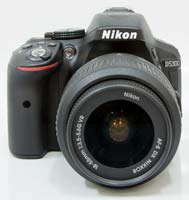
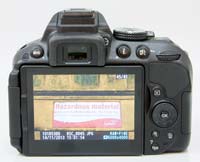 FrontRear
 The Nikon D5300 follows conventional DSLR design in having a shooting mode dial on the top of the camera, which allows you to select either one of the advanced modes like Manual, Aperture- or Shutter-priority, or a number of scene modes. The Exposure Compensation button is thoughtfully positioned next to the shutter release. Hold down this button with your right forefinger and spin the control wheel on the top-rear of the camera with your thumb to adjust its settings - simple and intuitive.
The Effects shooting mode, first introduced on the D5100, now provides 9 different filters that can be applied to both still images and movies. The Night Vision effect is particularly worth of mention, pushing the camera's sensitivity to a whopping ISO 102,400, although a monochrome rather than colour image is recorded. For stills, you can enter Live View mode to preview the effect or simply use the optical viewfinder. For movies, the recording is slowed down (dependent upon the chosen effect) as the camera uses a lot of processing power to apply the effect, leading to footage that can have a rather staccato feel. Note also that the camera sets virtually everything in the Effects mode - exposure, shutter speed, white balance, ISO, file type and quality - so its only creative in terms of the arty effect that's applied. Several of the same effects can be applied to an image or movie that you've taken, though, so you can have the best of both worlds (albeit without the luxury of a preview).
The second button sitting next to the shutter release is labeled 'info'. This button is arguably at the heart of the Nikon D5300's ease-of-use, as like its predecessor the camera lacks the monochromatic status LCD of the older D90, so Nikon had to provide a different way to check vital shooting information without having to look into the viewfinder. Enter the info button - pressing it displays virtually all of the camera's main settings on the large rear screen. Pressing the "i" button on the rear of the D5300 then allows you to interact with and set the onscreen options, with 14 available in total.
The rear articulated LCD screen is hinged at the side rather than the bottom. This fully articulated design is a much more flexible solution, allowing the screen to be folded out from the left side of the camera and folded inwards to protect it when not in use. The screen is slightly bigger than the D5200 at 3.2 inches and higher resolution too, with 1,037k dots, so there's nothing to complain about in this department. The screen also has an anti-glare coating, so that it's usable most of the time outdoors in strong daylight, although it still struggled a little with reflections.
The D5300's Live View is accessed in a different and arguably less intuitive way than on the D3200/D7100. Instead of a combined switch / button on the D3200/D7000, the D5300 has a fore-finger operated spring-loaded switch on top of the body that is pushed downwards and toggles between turning Live View on and off. Positioned next to the Shooting Mode dial, it allows you to enable Live View whilst holding the camera at arms length with one hand, or to turn it off as you hold the camera up to your eye. We'd prefer it to be on the rear of the camera and also to incorporate the Movie record button, in keeping with the D3200/D7100 models.
Press the Lv switch and the mirror flips up, the shutter opens and the rear screen displays the scene as seen through the lens. There is a red rectangle in the middle, which you can move practically anywhere in the frame. When in manual focus (MF) mode, you can magnify into this rectangle in a number of steps by repeatedly pressing the button marked with a loupe icon, but this magnification seems to be at least partially interpolated. This means that you cannot see detail down to the pixel level, unlike some competing cameras.
Fortunately, MF is not the only focusing option in Live View, at least as long as you are taking stills. Single-servo AF (AF-S) and Full-time-servo AF (AF-F) modes are also available and, while slow, they tend to be accurate. Both modes can also be used in connection with face detection. 'Face-priority AF' had no problem finding and keeping track of human faces as long as they were facing the camera, but acquiring focus was another story - very, very slow.
Live View must also be entered to shoot movies. After pressing the Lv button and optionally presetting the aperture and focus, you can start recording video by pressing the dedicated Movie Record button on top of the camera next to the shutter release. The camera records full high-definition, wide-screen video in 1920x1080 pixel resolution, at a frame rate of 60p/50p/30p/25p/24p, in AVI format using the motion JPEG codec. As with Live View, contrast-detect AF is possible whilst shooting movies, although as with still images there's an audible whine as the camera refocuses and it's still too slow to focus on any fast-moving subject, so much so that we suspect most serious users will use manual focusing instead. Although the D5300 can automatically focus during video recording, it's just not fast enough to warrant regular use.
You can set both the aperture and the shutter speed during movie recording, although the slowest shutter speed is limited to 1/30th second, plus exposure compensation and AE-Lock can also be set. Out of the box the D5300 can record stereo sound via its built-in microphone with three different levels of sensitivity on offer, and improved sound can also be recorded using an optional external microphone. The maximum size of a single video clip is 2 gigabytes which, given that movies occupy about 100 megabytes of storage space per minute, would theoretically translate into about 20 minutes of continuous recording.
The D5300 has a proper through-the-lens optical viewfinder with a slightly improved magnification of 0.82x, on par with most of its rivals. The Nikon D5300's 39 auto-focus points are permanently marked on the focusing screen, whereas the compositional grid lines can be called up via a menu option. Two warning signs - telling you that the battery is running low or you have forgotten to insert a memory card - may also appear in the form of overlaid icons when appropriate. Below the finder is a traditional monochromatic status bar showing practically all relevant shooting information (including the ISO sensitivity, if so specified in the menu).
As stated above, the Nikon D5300 has 39 auto-focus sensors, out of which 9 are cross type. The other thirty are of the line variety, consequently being only sensitive to either vertical or horizontal detail, but not both. In practice, this did not turn out to be a real problem, with the camera typically locking focus on the subject quickly and easily, no matter which AF point was selected. In the viewfinder, the active AF point appears in red, which is easy to see. Selecting the active AF point is done by way of the four-way pad - except if you choose Auto Area AF - again a simple and intuitive solution. In low light, the AF sensors are helped by an AF assist lamp located on the front plate of the camera.
The 2,016-pixel RGB metering sensor used by the D5300 is again identical to the system used by the more expensive D7100 model. This provides precise data to the camera's Scene Recognition System, which optimises exposure, autofocus and white balance immediately before the shutter is released.
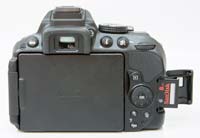
 Memory Card SlotBattery Compartment
 The Nikon D5300 only has one control wheel and there are no dedicated buttons for controlling ISO sensitivity, white balance, metering or AF mode. The Fn button can be reprogrammed to perform ISO selection or white balance adjustment (or one of a few other functions such as file quality specification), but the others still have to be set through the main info screen, called up by pressing the [ i ] button top-right of the rear display. With practice, performing adjustments via this screen becomes fairly quick and easy, but it's not as efficient as the older D90's dedicated controls.
Most of the camera's rear controls are scattered, seemingly almost randomly, to the right of the D5300's large folding screen. While we can understand the need to locate them to accomodate the 3 inch LCD, the positioning of the Zoom In and Zoom Out buttons in particular isn't very intuitive, being operated with your right-hand thumb, and right next to the Delete button. As the D5300 isn't a very complex camera in terms of the number of external controls, it thankfully doesn't get too confusing, but is something to consider from an ergonomic point of view.
For the images that you've already already captured, the Nikon D5300 offers a broad range of retouching tools, including post-capture D-lighting (useful if you forgot to turn on Active D-lighting before capture), red-eye correction, trimming, monochrome conversion, different filter effects, colour adjustments, image resizing, image overlay, in-camera raw processing, quick auto retouching, straightening of crooked pictures, lens distortion correction, fisheye, colour outline, colour sketch, selective colour, miniature effect, and perspective control. Many of these functions make it unnecessary to buy specialised computer programs or plug-ins and spend hours in front of a computer to achieve a desired/popular effect.
The Nikon D5300 is powered by a proprietary EN-EL14a Lithium-ion battery, good for 600 shots, and records videos and image files on SD/SDHC/SDXC cards. As we noted in our D5200 review, we would really have liked to see Nikon add a second card slot for Compact Flash cards, so that owners of higher-specified Nikon DSLRs who buy a D5300 as a second body can use their existing memory cards. It also lacks the dual-SD slots of the D7100. As far as connectivity goes, there are USB/VideoOut and Mini HDMI ports as well as an accessory terminal for the connection of a wired remote or a GPS unit, all sheltered behind a door on the left side of the camera, when viewed from the back.
That concludes our look at the D5300's interface and feature-set. Now let's take a look at the D5300's image quality...
Entry Tags
Source: Photographyblog
Nikon NEF Codec updated with support for Nikon DF, D5300 digital SLRs
by Mike Tomkins
Planning to pick up one of Nikon D5300 Offers's latest digital SLRs as soon as it hits the market, and want to be ready when it shows up? If so -- and if you're using a Windows XP, Vista, 7, or 8 computer -- we've got a download you'll want to grab.
Nikon has just updated its NEF Codec package, which lets Windows machines display thumbnails of .NEF raw images in Windows Explorer, just as they do for your JPEG files. The latest release, NEF Codec v1.20.0, adds support for the recently-announced, soon-to-ship Nikon DF and D5300 digital SLRs. It follows on from the recent version 1.19.0, which newly supported the Nikon 1 AW1 and D610.
If you want to update your Nikon raw support in Explorer, download a copy of the free Nikon NEF Codec package now.
(via Nikon Rumors)
Source: Imaging-resource